Windows SmartScreen guide
Download LocalWAMP
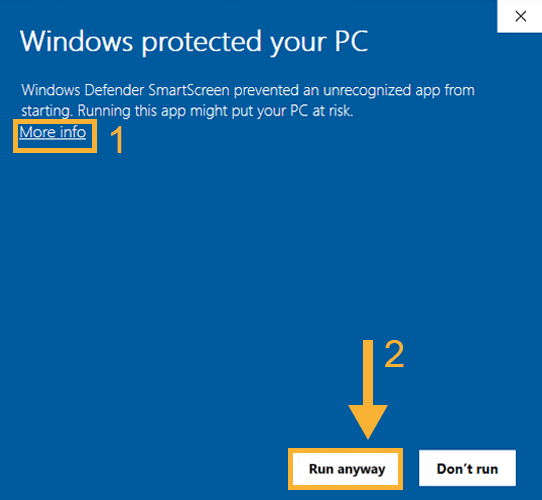
The first launch can show a Windows Defender SmartScreen warning because Windows has not yet built a reputation for the app. If that happens, click More info and then Run anyway.
- Step 1Click More info on the SmartScreen dialog.
- Step 2Click Run anyway to continue launching the app.
Download latest version
Download verification
Version: v1.3.0
File: LocalWAMP-v1.3.0.zip
SHA256:
Version: v1.3.0
File: LocalWAMP-v1.3.0.zip
SHA256:
50A5EA6AEDB5841051FC8B3027D6F62C853C4BC3727480E6C66E6B1579C011CB
The button starts the download of the latest version.
In the future, access to the version archive will also be available.